![Horizontal-10.png]](https://support.minga.io/hs-fs/hubfs/Horizontal-10.png?height=40&name=Horizontal-10.png)
Summary (click to navigate):
My Class- User List Improvements
MyClass- At a Glance Hall Pass History
Hall Pass Dashboard Persistence
FlexTime- Changes to "Remove"
Updated Settings Dashboard
FAQs
Key Updates:
My Class - User List Improvements
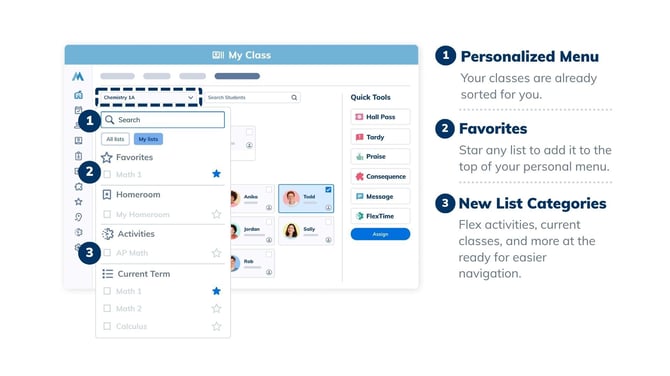
Managing multiple rosters just got easier. We’ve introduced a new user list dropdown within My Class, allowing teachers to switch between their different classes seamlessly. Additionally, teachers can now "favorite" their most frequently used lists for instant access at the top of their selection.
Who's it for?
Teachers managing multiple class sections or student groups.
How It Works:
-
Navigate to My Class.
-
Use the new dropdown menu to select or switch between classes.
-
Click the favorite icon next to a list to pin it for easy access.
Why It Matters:
-
Improved Organization: Teachers can quickly toggle between rosters without navigating away from the My Class view.
-
Personalized Workflow: Favoriting lists ensures that high-priority classes are always just one click away.
My Class - At-a-Glance Hall Pass History
Teachers now have immediate visibility into a student's pass activity for the day. When a teacher goes to request a pass for a student, or when a student's pass has just ended, a brief history of that student's daily passes will be displayed.
_200kb.png?width=670&height=377&name=Hall%20Pass%20Pills%20(1)_200kb.png)
Who's it for?
Teachers using the Hall Pass module.
How It Works:
-
Navigate to My Class.
- When a student requests a pass, the request icon will show how many passes they have had that day.
Why It Matters:
-
Informed Decision Making: Quickly see if a student has already been out of class multiple times before granting a new pass.
-
Increased Accountability: Helps identify patterns of pass usage at a glance.
Hall Pass - Dashboard Filter Persistence
Staff members will no longer need to reapply their preferred filters every time they refresh the page. Any filters set within the Hall Pass dashboard will now persist across sessions and page refreshes.
.png?width=670&height=399&name=1%20dashboard%20(1).png)
Who's it for?
Owners, Managers, Teachers, and Staff who use the Hall Pass Dashboard and want their filters to remain after selecting them.
How It Works:
-
Navigate to the Hall Pass Dashboard.
- Select your desired filters.
Why It Matters:
-
Efficiency: Saves time for staff who monitor specific zones, grades, or pass types throughout the day.
-
Reduced Friction: Provides a more reliable and consistent administrative experience.
FlexTime - Changes to “Remove” in FlexTime
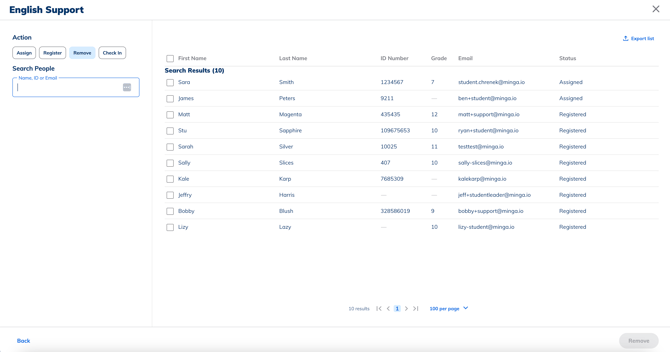
We have updated the "Remove" functionality within FlexTime rosters to ensure a consistent experience across the platform. Whether you are in the dashboard, viewing reports, or using the people selector, the removal process now behaves identically.
Who's it for?
Admins and Teachers managing FlexTime rosters.
- Navigate to Activities in FlexTime.
- Select the required period.
- Click on the Manage Activity button.
- Click on the Remove button.
Why It Matters:
-
Consistency: Eliminates confusion by providing a predictable workflow regardless of which tool is being used to manage student lists.
Updated Settings Dashboard
We have revised the Settings Dashboard to enhance usability and provide better data visibility for leadership.
Who's it for?
District Managers, Super Admins, and Owners.
What’s New:
-
Revised Columns: Updated layout for District Managers and Super Admins to prioritize key metrics.
-
Owner Access: Owners now have the ability to view the dashboard specifically for their schools.
-
UI Enhancements: General visual updates to improve navigation and overall usability.
Why It Matters:
-
Better Oversight: District leaders and owners can more effectively monitor school performance and settings.
-
Modernized Experience: A cleaner UI leads to faster task completion and less administrative fatigue.
FAQs
-
Will MyClass automatically know which my favorite User Lists are? No, but you can mark your most used/ favorite lists by clicking on the star icon next to the list name in the User List drop-down.
- Can I collapse the sections in the User List drop-down in MyClass? Yes! You can use the arrow icon to collapse sections like Current Term and My Lists to keep your list views concise and manageable.
- Will my filter selections on the Hall Pass Dashboard remain in place until I change them? The filter selection will reset if you clear your browser cache.